
How to Build a Scalable WhatsApp Notification System for SaaS (Architecture Guide)
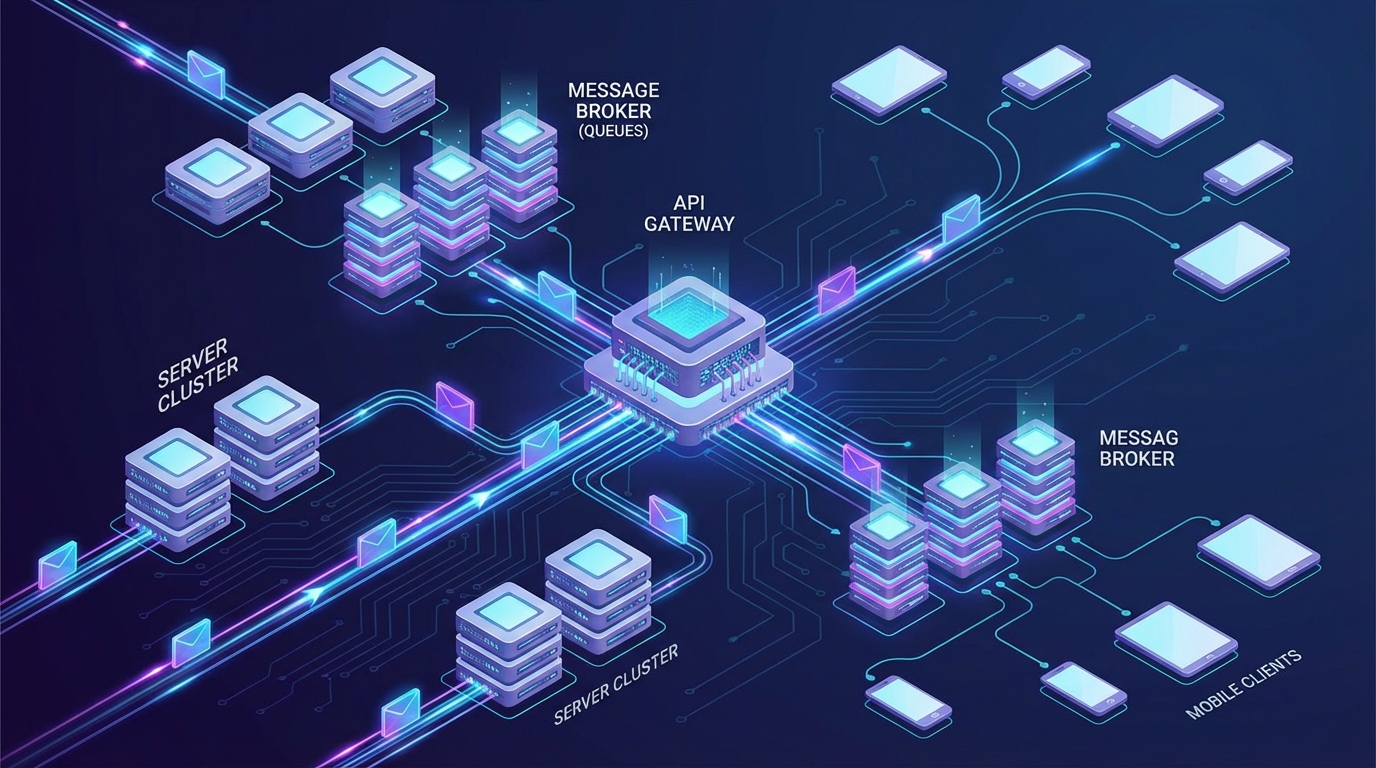
Building a scalable WhatsApp notification system is no longer just a luxury for modern SaaS platforms; it is a critical requirement for maintaining high user engagement and operational trust. As businesses increasingly move away from easily ignored emails to high-visibility WhatsApp alerts, the underlying infrastructure must be capable of handling sudden spikes in message volume without dropping payloads or crashing your application.
A truly scalable WhatsApp notification system requires more than just a basic API script. It demands a robust architectural framework that includes asynchronous message queueing, intelligent webhook management, automated retry logic, and seamless session handling. When your SaaS application needs to send thousands of billing alerts, security pins, or system updates simultaneously, relying on synchronous API calls will inevitably lead to bottlenecks and timeouts.
In this comprehensive guide, we will explore the engineering principles required to design a fault-tolerant messaging infrastructure. We will break down the core components of a reliable system, discuss how to handle rate limits gracefully, and explain how leveraging a dependable REST API like WasenderApi can simplify your backend architecture.
Why SaaS Companies Need Enterprise-Grade WhatsApp Infrastructure
For technical founders and lead software engineers, integrating a third-party messaging service introduces a new layer of complexity. If your application sends a critical server downtime alert or an OTP (One-Time Password) that fails to deliver, the immediate result is an increase in support tickets and a degradation of user trust. Building a resilient infrastructure mitigates these risks.
- High Deliverability Requirements: Unlike promotional newsletters, transactional SaaS notifications are time-sensitive. Users expect instant delivery for password resets and payment confirmations.
- Traffic Spikes and Throttling: SaaS platforms often experience burst traffic—such as end-of-month invoice generation. Your system must queue these messages and process them at a rate the API can handle.
- State Management: Maintaining persistent connections to WhatsApp requires dedicated memory and processing power. Offloading this to a reliable provider ensures your core application remains lightweight.
By treating your WhatsApp integration as a core microservice rather than an afterthought, you ensure that your platform can scale from a few hundred daily active users to hundreds of thousands without requiring a complete rewrite of your notification logic.
Core Components of a Scalable WhatsApp Notification System
To achieve high availability and prevent data loss, your architecture must decouple the message generation logic from the actual message dispatching process. Here are the three foundational pillars of a robust messaging infrastructure.
1. Asynchronous Message Queueing
Never send WhatsApp messages synchronously within your main application thread. If the API provider experiences a momentary delay, your entire application could hang, leading to a poor user experience. Instead, implement a message broker such as RabbitMQ, Redis (via Celery or BullMQ), or AWS SQS.
When an event triggers a notification (e.g., a successful payment), your application should instantly write a job to the queue and return a success response to the user. A separate background worker then picks up the job from the queue, formats the payload, and transmits it via the WhatsApp API. This decoupling ensures that your web servers remain highly responsive regardless of external API latency.
2. Dead Letter Queues (DLQ) and Retry Logic
Network failures, temporary API outages, and rate-limiting errors are inevitable in distributed systems. A scalable WhatsApp notification system must anticipate these failures. If a message fails to send, the background worker should not simply discard it.
Implement an Exponential Backoff retry strategy. If the first attempt fails, the system waits 5 seconds before retrying. If the second attempt fails, it waits 15 seconds, then 45 seconds, and so on. If the message continues to fail after a predefined number of attempts, it should be routed to a Dead Letter Queue (DLQ). The DLQ acts as a holding pen for failed messages, allowing your engineering team to inspect the errors, fix the underlying issue, and manually re-process the queue without losing critical alerts.
3. Webhook Event Management
Sending the message is only half the battle; tracking its lifecycle is equally important. To provide users with accurate delivery statuses (Sent, Delivered, Read), your system must process incoming webhooks efficiently.
Because webhooks can arrive in massive, unpredictable bursts, your webhook receiving endpoint should do nothing more than validate the payload authenticity and immediately push the data into a high-speed ingestion queue (like Kafka or Redis). Background processors can then take their time updating your primary database. This prevents your webhook endpoints from timing out and ensures you never miss a status update.
Architectural Framework: Designing for Fault Tolerance
Now that we understand the components, let us look at how to structure the database and application logic to support a high-volume, multi-tenant environment. This framework is particularly useful for growth-focused agencies managing multiple client accounts or SaaS platforms with distinct user workspaces.
Idempotency and Duplicate Prevention
In distributed systems, the "at-least-once" delivery model is common, meaning a message might accidentally be processed twice during a network partition. To prevent sending duplicate WhatsApp messages to your users, implement Idempotency Keys.
Generate a unique hash for every notification event based on the user ID, event type, and timestamp. Before the background worker dispatches the API call, it checks the database or a fast key-value store (like Redis) to see if that exact idempotency key has been processed in the last 24 hours. If it has, the worker safely skips the execution.
Database Schema for Observability
Visibility into your messaging infrastructure is crucial for debugging and customer support. Create a dedicated `communications_log` table in your database with the following structure:
- Message ID: The unique identifier returned by the WhatsApp API provider.
- Recipient: The formatted phone number.
- Payload: A JSON representation of the message content.
- Status: An enumerable field (Queued, Sent, Delivered, Read, Failed).
- Error Reason: A text field to store API error codes if the message fails.
- Created At & Updated At: Timestamps for tracking latency and delivery speed.
By indexing the Message ID and Recipient columns, your customer support team can quickly query the exact status of any notification when a user claims they did not receive an alert.
Managing Rate Limits and Throttling
Even the most robust APIs have rate limits to protect their infrastructure. When building your scalable WhatsApp notification system, you must respect these limits to avoid temporary bans or degraded service.
Implement a Token Bucket or Leaky Bucket algorithm within your dispatching workers. If your provider allows 50 messages per second, configure your workers to process a maximum of 45 jobs per second across all nodes. If the queue size grows faster than the processing rate during a traffic spike, the asynchronous nature of your architecture ensures that messages simply wait in line safely rather than overwhelming the API and triggering HTTP 429 (Too Many Requests) errors.
Implementing the Solution with WasenderApi
Building the internal queueing and database architecture is entirely within your control, but managing the actual connection to the WhatsApp network requires a highly reliable partner. This is where WasenderApi excels as an infrastructure component for technical founders.
Instead of wrestling with complex session management, QR code regeneration, and node-level memory leaks, you can offload the heavy lifting to WasenderApi. Our platform is designed with uptime discipline and redundancy at its core, ensuring that when your background workers fire off an API request, it is processed swiftly and reliably.
Integrating WasenderApi into your microservices architecture is straightforward. You simply format your JSON payload, attach your API key, and make a standard HTTP POST request. For comprehensive details on endpoint structures, webhook configurations, and payload formatting, please refer to our official API documentation.
Conclusion
Transitioning from a basic script to a fully scalable WhatsApp notification system requires a shift in engineering mindset. By embracing asynchronous queueing, implementing robust webhook ingestion, and designing for fault tolerance with dead letter queues and idempotency, you can build a messaging infrastructure that scales effortlessly alongside your SaaS platform.
Partnering with a reliable infrastructure provider like WasenderApi ensures that your engineering team can focus on building core product features rather than debugging dropped connections. When uptime, deliverability, and operational trust are non-negotiable, a properly architected system is your strongest asset.
Frequently Asked Questions (FAQ)
How do I handle WhatsApp API rate limits in a SaaS application?
To handle rate limits effectively, you should decouple your application logic from the API calls using a message queue (like RabbitMQ or Redis). Implement a Token Bucket algorithm in your background workers to control the exact number of messages dispatched per second, ensuring you stay safely below the API provider's limits and avoid HTTP 429 errors.
What is the best way to queue WhatsApp messages for high volume?
The best approach is to use an asynchronous job queue such as AWS SQS, Redis (with BullMQ or Celery), or RabbitMQ. When your application triggers an alert, it should instantly write the job to the queue. Separate background workers should then process the queue, format the payload, and send it to the WhatsApp API, ensuring your main web servers remain fast and responsive.
How can I ensure my webhook endpoints do not crash during traffic spikes?
To prevent webhook crashes, your receiving endpoint should be as lightweight as possible. It should only validate the incoming payload and immediately push the data into a high-speed ingestion queue (like Kafka). Background processes can then read from this queue to update your database at a controlled pace, preventing database locks and server timeouts.
Why should I use WasenderApi for my SaaS messaging infrastructure?
WasenderApi provides a highly reliable, RESTful architecture designed specifically for developers and SaaS platforms. By handling the complex underlying node connections, session state management, and uptime redundancy, WasenderApi allows your engineering team to focus on building features rather than maintaining fragile messaging connections.
Related Posts

n8n + WaSenderAPI: Master WhatsApp Automation Without Code (2025 Guide)
Discover the most affordable WhatsApp automation solution only $6/month with WaSenderAPI combined with no-code n8n workflows. Build perfect, custom WhatsApp automations quickly and easily without coding. Follow our step-by-step guide to save costs while creating powerful, scalable, and secure WhatsApp messaging for your business.

Create a Free WhatsApp AI Chat Bot with Python and Gemini (Full Guide)
Learn how to create a free WhatsApp AI chatbot using Python, Google’s Gemini API, and WaSenderAPI. This step-by-step guide helps you build and deploy an intelligent WhatsApp assistant at minimal cost no need for WhatsApp Business API.

WhatsApp API Rate Limits Explained: How to Scale Messaging Safely in 2025
Struggling with WhatsApp messaging restrictions? Learn how Meta's tier system works, how to upgrade your daily limits, and how to scale your broadcasts safely without getting banned.